
How to Sign a PDF Online for Free (No Printing or Scanning)
Sign a PDF online for free. Draw, type, or upload your signature, place it on the line, and download — no printing, scanning, or software.
You need to sign a PDF.
Maybe it is a contract, an offer letter, a lease, or a consent form.
The old way is painful. Print the page, sign it with a pen, scan it back, and hope the scan is straight and readable.
You do not have to do any of that. This guide shows you how to sign a PDF online for free, right in your browser, with no printing and no scanning.
What it means to sign a PDF online
Signing a PDF online means adding your signature straight onto the file on screen, then downloading a finished copy. Nothing is printed and nothing is scanned.
There are three common ways to create the signature itself:
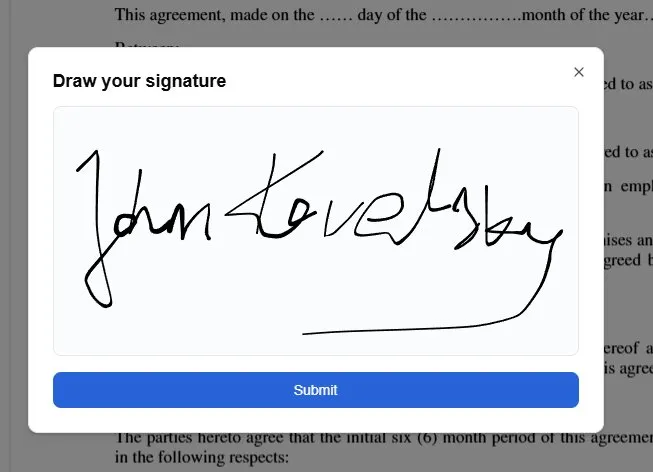
- Draw it with your mouse, trackpad, or finger
- Type it and let the tool render it in a handwriting style
- Upload a saved signature you have used before
All three end the same way: a clean signature sitting exactly where it belongs on the page, merged into the PDF so it looks the same in every viewer.
How to sign a PDF online: step by step
Here is the full process. It works in any modern browser, on a laptop, tablet, or phone.
Step 1 — Upload your PDF
Open the filler in your browser and upload the document you need to sign. There is nothing to install, and you do not need an account to get started.
Step 2 — Add your signature
Choose Add signature, then draw, type, or place a saved signature. Drawing with a finger on a phone or trackpad gives the most natural result, while typing is fastest when you just need a clean, legible signature.
Step 3 — Place it on the signature line
Drag the signature onto the signature line and resize it so it fits neatly. You stay in control of the size and position, so it lines up cleanly with the printed layout instead of floating over the text.
Step 4 — Add the date and initials
Many documents also need a date next to the signature, and some need your initials on every page. Drop a text box for the date, add initials where required, and place a checkmark or an X on any boxes that need one.
Step 5 — Download the signed PDF
When everything looks right, download the file. You get a standard PDF with your signature merged into the page, ready to email, upload to a portal, or keep for your records.
That is the whole process. No printer, no scanner, no pen.
How to sign a PDF without printing or scanning
The print-sign-scan routine exists only because people assume a signature has to be made on paper. It does not.
When you sign online, your signature is added as part of the document itself. Because it is merged into the page on download, the recipient sees a properly signed form, not a separate image pasted on top. This is the same idea behind filling a form online instead of by hand — for the full walkthrough, see our guide on how to fill out a PDF form.
Skipping the printer and scanner also means no crooked scans, no wasted ink, and no waiting until you are near a machine. If you have been weighing this against the old method, our comparison of filling a PDF online vs printing breaks down the difference.
How to sign a PDF on your phone
You do not need a computer to sign a document.
Because everything runs in the browser, you can sign a PDF on a phone or tablet with no app to install. Open the file from your email or cloud storage, draw your signature with a finger, place it on the line, and download the signed copy to send straight back.
This is genuinely useful when a document lands in your inbox and you are away from your desk.
Frequently asked questions
How do I sign a PDF for free?
Upload your PDF to an online filler, choose Add signature, then draw, type, or place a saved signature. Position it on the signature line and download the signed file. You can do all of this for free, with no software to install.
Can I sign a PDF without printing it?
Yes. Signing online adds your signature directly to the file, so there is no need to print, sign by hand, and scan. You download a finished PDF with the signature already merged into the page.
Do I need an account to sign a PDF?
No. You can upload a document and add a signature without creating an account. An account is only needed if you want to save a signature and reuse it across future documents.
How do I add a signature on my phone?
Open the PDF in your mobile browser, add a signature, and draw it with your finger. Drag it onto the signature line, resize it to fit, and download the signed file.
Will my signed PDF look the same for everyone?
Yes. Your signature is flattened into the page when you download, so it appears the same way in every PDF viewer rather than showing up in one app and disappearing in another.
Ready to sign your PDF?
You now know how to sign a PDF online for free, whether you draw, type, or reuse a saved signature — and all without printing or scanning.
The fastest way to see it work is to try it on your own document.
While you are at it, you can also annotate the PDF with notes and checkmarks before you sign.
Ready to start filling your PDFs?
Fill out PDF documents like a pro in minutes - no premium account needed.