
Using project templates
Learn how to use project templates to save time.
Your Premium account allows you to save your projects as templates for later use. Templates retain the data about your PDF file, but do not contain any values. You can use them in order to quickly set up a new form that you have configured earlier.

You can save the currently filled out PDF by clicking on the Save as Template button.
Accessing your templates
You can access your templates in the settings page. Go to My Account and select Templates tab.
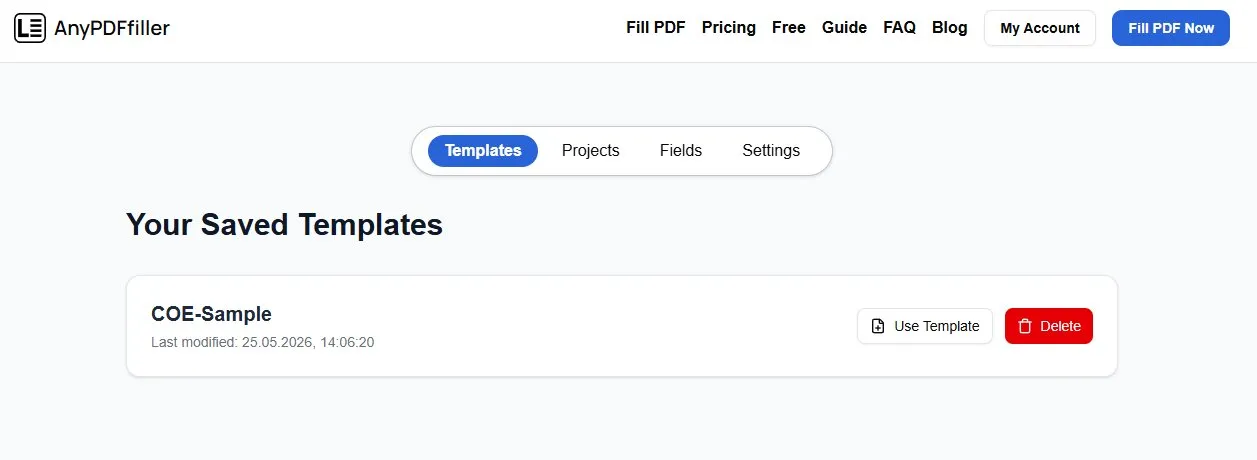
For Premium users there are no limits as to how many projects you can have saved as templates.
In order to quickly start a new project from the template, simply click the Use Template button. The template will be loaded into the PDF Filler page and you will be able to immediately start editing a new project that way.
You can also remove unnecessary templates by clicking on the Delete button.
Ready to start filling your PDFs?
Fill out PDF documents like a pro in minutes - no premium account needed.